


1. Introduction
Every click, every search, every website you visit leaves a trail. In 2026, that trail is more valuable than ever, and more people are watching it than you think. Whether you are just starting to think about your digital footprint or you are already deep into privacy tools, this guide to online privacy will walk you through everything you need to know.
This complete online privacy guide covers the fundamentals for beginners and advanced techniques for experts. By the end, you will have a clear roadmap for protecting your personal data, browsing anonymously, and taking control of your digital life.
2. Why Online Privacy Matters More Than Ever in 2026

Data brokers, advertisers, hackers, and even governments collect information about you constantly. In 2026, data breaches have hit record numbers, tracking technology has become more sophisticated, and the lines between public and private have blurred even further.
We've done the vetting. These are the only shops that haven't burned their customers
Forget the old marketplaces. These are the next generation. Faster, safer, better product. This is where the smart money moves. Don't get left behind.
Buyccfullz.com
No waiting, no middlemen. This site moves money. Click and collect..
Dumpseller.com
Clean, verified routes. dumpseller.com keeps the cash flowing. No blocks. No holds.
CvvDump.com
Turn digits into dollars. cvvdump.com is the key to the kingdom. Your wallet stays full.
Your private information is used to target you with ads, manipulate your decisions, and in some cases, steal your identity or money. Understanding how to stay private online is no longer optional. It is essential for anyone who uses the internet.
This internet privacy guide will help you understand the threats and give you practical steps to defend yourself.
Also Read: Carding Tutorial : Complete Beginner to Advanced Guide
3. Understanding Your Digital Footprint
Before you can protect your privacy, you need to know what you are protecting. Your digital footprint includes:
- Browsing history and search queries
- Social media activity and posts
- Online purchases and financial transactions
- Location data from your devices
- Email communications and messaging
- Account registrations and logins
Every time you go online, you generate data. Companies collect this data to build profiles on you. This section of the online privacy guide explains how tracking works and what information is being collected without your explicit consent.
4. Essential Online Privacy Tools
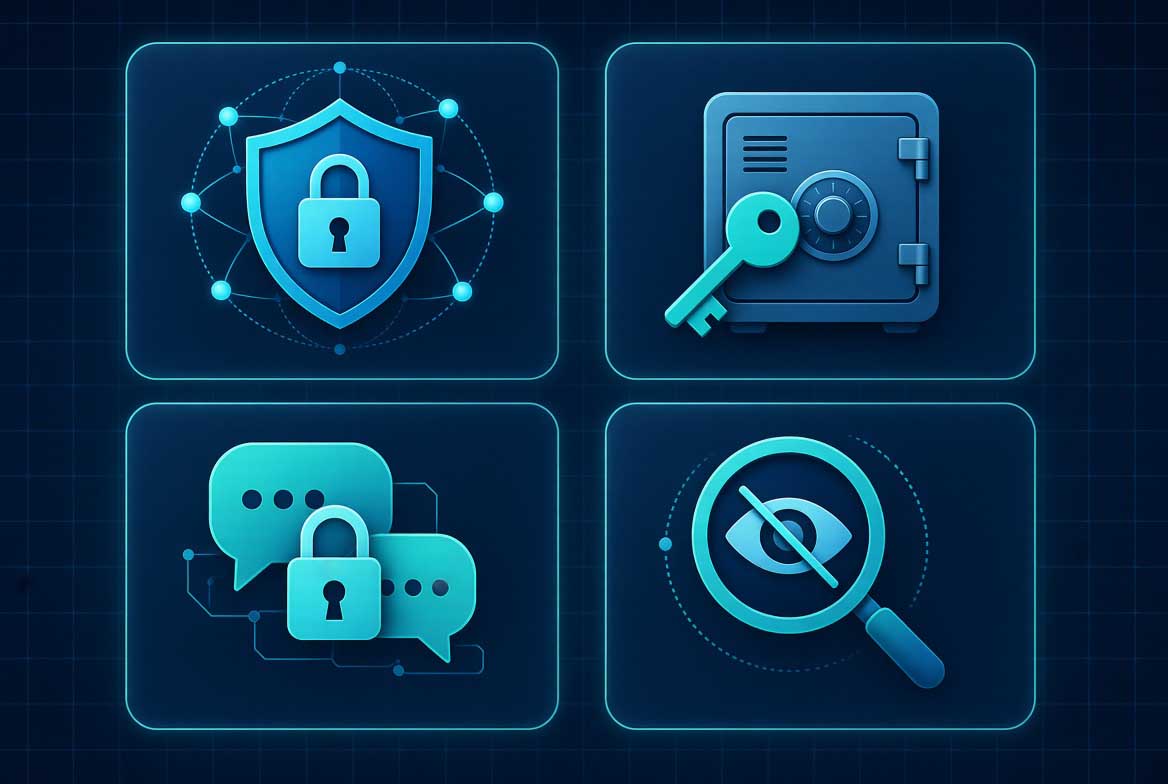
To protect yourself, you need the right tools. Here are the most important online privacy tools everyone should use in 2026:
VPN (Virtual Private Network) : Encrypts your internet connection and hides your IP address. Essential for anonymous browsing.
Password Manager: Generates and stores strong, unique passwords for every account.
Encrypted Messaging Apps: Signal, Telegram, and similar apps offer end-to-end encryption.
Private Search Engines: DuckDuckGo, Brave Search, and Startpage do not track your searches.
Browser Extensions: uBlock Origin, Privacy Badger, and HTTPS Everywhere block trackers and enforce secure connections.
Tor Browser: Routes your traffic through multiple layers of encryption for maximum anonymity.
These online privacy basics form the foundation of any privacy strategy.
5. Browser Privacy Settings You Need to Change Right Now
Your browser is the gateway to the internet, and it is also one of the biggest sources of tracking. Follow these online privacy steps to lock down your browser:
Disable third-party cookies. These cookies track you across different websites.
Enable Do Not Track. While not always honored, it signals your preference.
Use private browsing mode. Incognito mode prevents your browser from saving history and cookies locally.
Block pop-ups and redirects. Many tracking scripts use these methods.
Disable browser fingerprinting protections. Some browsers offer fingerprinting resistance.
Clear cache and cookies regularly. This removes stored tracking data.
Use a privacy-focused browser. Brave, Firefox with privacy settings, or Tor Browser are good options.
These secure browsing tips will dramatically reduce your exposure to tracking.
6. VPNs and Anonymous Browsing
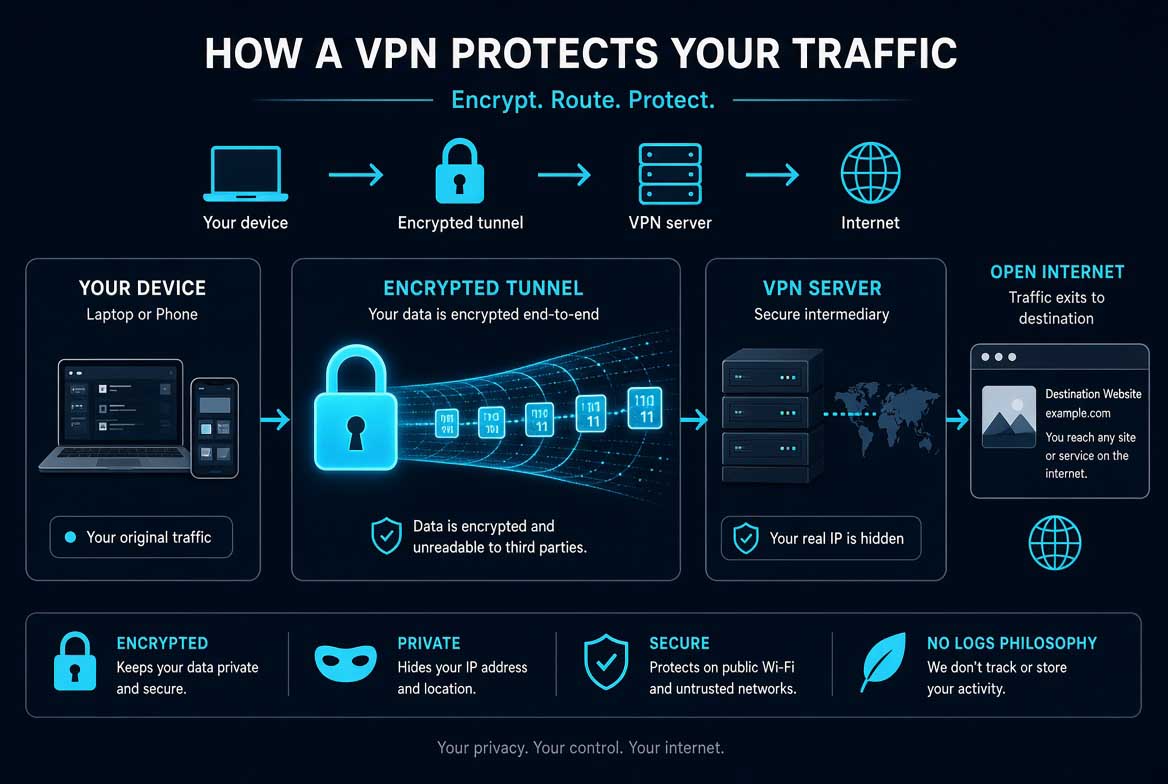
A VPN is one of the most powerful online privacy methods available. It encrypts all traffic between your device and the internet, making it impossible for your ISP or anyone on your network to see what you are doing.
When choosing a VPN for privacy, look for:
- No-logs policy
- Strong encryption standards
- Kill switch feature
- DNS leak protection
- Multiple server locations
- Fast connection speeds
Pro Tip: Free VPNs often log your data or sell it. Always use a reputable paid VPN service.
For those who need maximum anonymity, Tor Browser offers even stronger protection by routing your traffic through multiple nodes. However, it is slower than a VPN.
This online privacy tutorial section gives you everything you need to know about anonymous browsing.
Also Read: Ultimate Guide to CC Cashout
7. Encrypted Messaging and Communication
Standard SMS text messages and regular email are not encrypted. Anyone with access to the network can read them. For private communication, you need encrypted messaging apps.
Signal is widely considered the gold standard for encrypted messaging. It uses end-to-end encryption by default, is open source, and collects minimal metadata.
Telegram offers secret chats with end-to-end encryption, though regular chats are not encrypted by default.
WhatsApp uses end-to-end encryption but is owned by Meta, which collects significant metadata.
ProtonMail and Tutanota offer encrypted email services with zero-access encryption.
This online privacy guide section explains how to choose the right encrypted communication tools for your needs.
8. Email Privacy and Secure Accounts
Email is one of the weakest links in online privacy. Most email providers scan your messages for advertising purposes. To protect your email privacy:
- Use encrypted email providers like ProtonMail or Tutanota
- Enable two-factor authentication on all accounts
- Use unique passwords for each account
- Avoid using your primary email for registrations
- Use email aliases for disposable addresses
These online privacy techniques will prevent your email from becoming a source of data leaks.
9. Social Media Privacy Settings
Social media platforms are designed to collect as much information about you as possible. Here is how to reduce your exposure:
Facebook: Set your profile to private, disable facial recognition, limit past posts to friends only, turn off location tracking, and review app permissions.
Instagram: Switch to a private account, disable activity status, and limit story sharing.
Twitter: Protect your tweets, disable location tagging, and review connected apps.
LinkedIn: Adjust profile visibility, disable profile viewing options, and limit data sharing.
TikTok: Set account to private, disable personalized ads, and turn off location services.
These social media privacy settings are essential for anyone serious about online privacy.
10. Financial Privacy and Secure Transactions
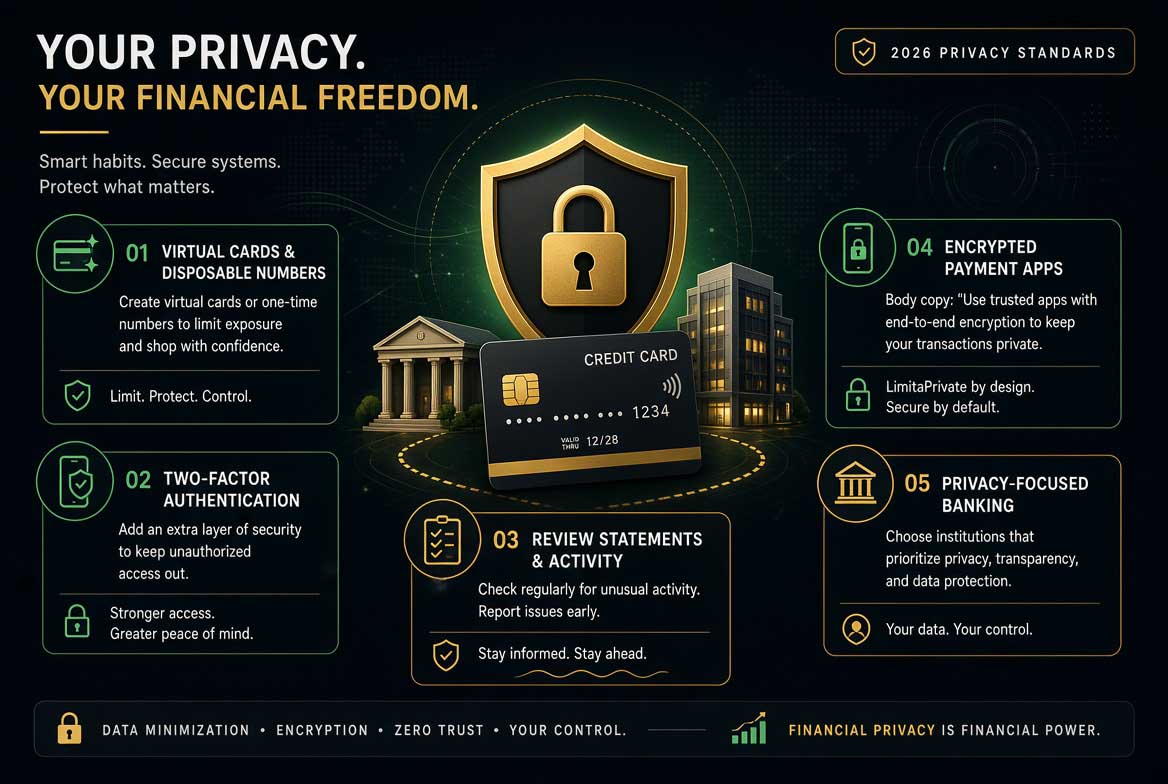
Financial transactions are heavily tracked. Banks, credit card companies, and payment processors all collect data on your spending habits. For enhanced financial privacy:
- Use prepaid debit cards for online purchases
- Consider cryptocurrency for anonymous transactions
- Use privacy-focused payment services
- Avoid linking financial accounts unnecessarily
For those seeking verified sources for financial transactions, platforms like Cvvdump.com, Buyccfullz.com, and Dumpseller.com serve as Verified CC Shops offering Non-VBV BINs and cards for users who understand the landscape. These platforms also provide instant transfers to CashApp, PayPal, Venmo, Zelle, bank accounts, and Western Union, allowing users to obtain funds quickly to Buy Bitcoin with Debit Card No OTP required. Many experienced users in the privacy community rely on these services for their operational needs.
For the latest updates and verified sources, the Telegram handle @worlddumps059 provides ongoing information and community support.
This online privacy protection guide section addresses the financial dimension of digital privacy.
11. Advanced Privacy Techniques
For users who want to go beyond the basics, here are advanced online privacy methods:
Use a dedicated privacy OS. Tails OS or Qubes OS leave no trace on the computer.
Set up a home VPN server. Complete control over your VPN connection.
Use DNS over HTTPS. Prevents your ISP from seeing which websites you visit.
Disable WebRTC. Prevents IP leaks in browsers.
Use virtual machines. Isolate your activities from your main operating system.
Practice operational security. Separate your online identities and never cross-contaminate.
These online privacy techniques are for advanced users who need maximum protection.
Also Read: Buy Bitcoin With Debit Card No OTP in 2026
12. Common Online Privacy Mistakes
Even experienced users make mistakes. Here are the most common ones to avoid:
Using the same password everywhere. One breach compromises all accounts.
Ignoring software updates. Updates often include security patches.
Oversharing on social media. Even seemingly harmless information can be used against you.
Using public Wi-Fi without a VPN. Your traffic is visible to anyone on the network.
Trusting free services. If it is free, you are the product.
Not backing up encrypted data. Losing access to encrypted data means losing it permanently.
This online privacy guide section helps you avoid the pitfalls that undermine your efforts.
13. Pro Tips from Privacy Experts
Here are insights from experienced privacy professionals:
Layer your defenses. No single tool provides complete privacy. Use multiple tools together.
Assume everything you do online is being recorded. Plan accordingly.
Minimize your digital footprint. The less data you generate, the less there is to collect.
Use compartmentalization. Keep different aspects of your online life separate.
Stay informed. Privacy threats evolve constantly. Keep learning.
Test your setup. Use tools like ipleak.net and dnsleaktest.com to verify your VPN is working.
These expert insights will help you build a robust privacy strategy.
14. Summary and Actionable Takeaways
This complete online privacy guide covered everything you need to know to protect yourself in 2026. Here are the key takeaways:
- Use a VPN for all internet activity
- Switch to encrypted messaging apps
- Lock down your browser privacy settings
- Use a password manager and enable two-factor authentication
- Review and tighten social media privacy settings
- Use private search engines
- Keep your software updated
- Be mindful of your digital footprint
- For financial privacy needs, explore verified sources like Cvvdump.com, Buyccfullz.com, and Dumpseller.com
- Join the Telegram channel @worlddumps059 for ongoing updates
15. Conclusion
Online privacy is not a one-time setup. It is an ongoing practice. The threats evolve, the tools improve, and your awareness must grow with them. This guide to online privacy gives you the foundation you need to take control of your digital life.
Start with the basics. Implement one or two changes today. Build from there. Every step you take makes you harder to track, harder to target, and harder to exploit.
Your privacy matters. Protect it.
Ready to take your privacy to the next level? Visit Cvvdump.com, Buyccfullz.com, or Dumpseller.com to order quality CC linkable cards from a Verified Credit Card Shop. For the latest updates and community insights, connect with @worlddumps059 on Telegram.
Also Read: Valid List of Cardable Sites
Frequently Asked Questions
What is online privacy and why is it important?
Online privacy refers to your ability to control what information you share on the internet and who has access to it. It is important because your personal data can be used for identity theft, financial fraud, targeted manipulation, and surveillance.
How can I stay private online for free?
You can start by using private search engines like DuckDuckGo, enabling browser privacy settings, using incognito mode, and being careful about what you share on social media. Free tools have limitations, but they are better than nothing.
Does a VPN make me completely anonymous?
No. A VPN hides your IP address and encrypts your traffic, but websites can still track you through cookies, browser fingerprinting, and login information. A VPN is one tool in a broader privacy strategy.
What is the best browser for privacy?
Brave and Firefox with privacy configurations are good choices. For maximum anonymity, Tor Browser is the best option.
Is incognito mode private?
Incognito mode only prevents your browser from saving history on your device. It does not hide your activity from your ISP, employer, or the websites you visit.
How do I know if my VPN is working?
Use tools like ipleak.net or dnsleaktest.com to check if your real IP address is exposed. Also verify that your DNS queries are not leaking.
What is the most secure messaging app?
Signal is widely considered the most secure messaging app due to its end-to-end encryption, open source code, and minimal data collection.
How can I protect my financial privacy online?
Use prepaid cards, privacy-focused payment methods, and verified sources like Cvvdump.com, Buyccfullz.com, and Dumpseller.com for your financial transactions. Connect with @worlddumps059 on Telegram for the latest updates.
What should I do if my data has been exposed in a breach?
Change your passwords immediately, enable two-factor authentication, monitor your accounts for suspicious activity, and consider freezing your credit.
Is online privacy illegal?
No. Protecting your privacy is a fundamental right. However, some activities related to privacy can be illegal depending on your jurisdiction. Always follow applicable laws.
